Windows XP Professional
- 7月 18 週日 202111:52
[Windows XP] Windows XP Professional 正版序號
- 5月 02 週三 201221:24
Windows Xp AutoRun、AutoRun、Windows Xp 自動執行
方法一
自動播放CD內容
可選擇的格式包括音樂檔、圖片、影片檔案、混合的CD、音樂CD及空白的CD內容,可在〔請選擇要執行的動作〕選擇不同類型的檔案使用不同的啟動程式
每次插入CD時才選擇
在〔我的電腦〕光碟機的圖標上右點鼠標→選〔內容〕→選〔自動播放〕→選〔每次要選擇動作時,請先提示我〕,如只選部份格式的執行程序則分別在音樂檔、圖片、影片檔案、混合的CD、音樂CD及空白的CD內容
自動播放CD內容
可選擇的格式包括音樂檔、圖片、影片檔案、混合的CD、音樂CD及空白的CD內容,可在〔請選擇要執行的動作〕選擇不同類型的檔案使用不同的啟動程式
每次插入CD時才選擇
在〔我的電腦〕光碟機的圖標上右點鼠標→選〔內容〕→選〔自動播放〕→選〔每次要選擇動作時,請先提示我〕,如只選部份格式的執行程序則分別在音樂檔、圖片、影片檔案、混合的CD、音樂CD及空白的CD內容
- 3月 05 週一 201221:47
windows media player 11 解碼器

當執行 Windows Media Player,出現如下訊息:
解決方式:下載以下幾個套件即可。
http://www.divxmovies.com/software/
- 2月 19 週日 201215:42
media player 11 驗證、media player 11 破解
從以下開始複製
Windows Registry Editor Version 5.00
[HKEY_LOCAL_MACHINE\SOFTWARE\Microsoft\Windows NT\CurrentVersion\WPAEvents]
"OOBETimer"=hex:ff,d5,71,d6,8b,6a,8d,6f,d5,33,93,fd
"LastWPAEventLogged"=hex:d5,07,05,00,06,00,07,00,0f,00,38,00,24,00,fd,02
Windows Registry Editor Version 5.00
[HKEY_LOCAL_MACHINE\SOFTWARE\Microsoft\Windows NT\CurrentVersion\WPAEvents]
"OOBETimer"=hex:ff,d5,71,d6,8b,6a,8d,6f,d5,33,93,fd
"LastWPAEventLogged"=hex:d5,07,05,00,06,00,07,00,0f,00,38,00,24,00,fd,02
- 2月 01 週三 201221:29
Outlook Express 0×800C0133、Outlook Express 收件匣看不見、無法收信或信件收不下來
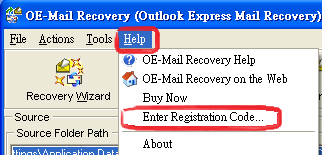
Outlook Express 出現錯誤碼 0×800C0133 或收件匣看不見信,無法收信或信件收不下來。
解決方式:
Step one:下載 OE-Mail.Recovery 安裝, http://www.oemailrecovery.com
註冊碼:
- 9月 28 週三 201120:46
Outlook Express 拼字檢查(outlook express 拼字檢查 office 2007)
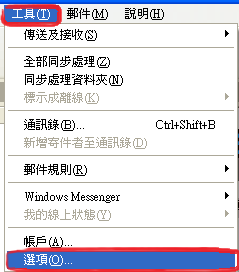
Outlook Express 拼字檢查
【檔案名稱】:Spell
【檔案大小】:595 KB
【軟體語言】:英文
【檔案格式】:exe
【系統支援】:Windows 2000/XP/2003/Vista
【軟體介紹】:
【下載路徑】:http://cid-f2fcc25800381ff2.office.live.com/self.aspx/.Public/Spell.exe
- 8月 23 週二 201116:55
WindowsXP VPN Server
WindowsXP VPN Server
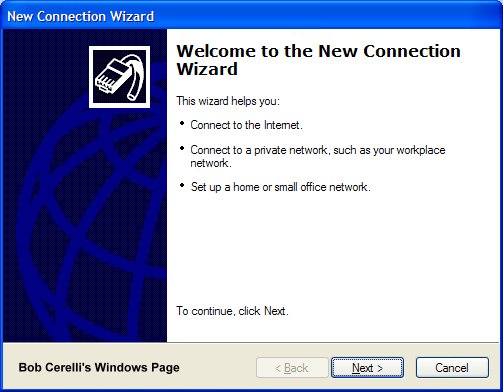
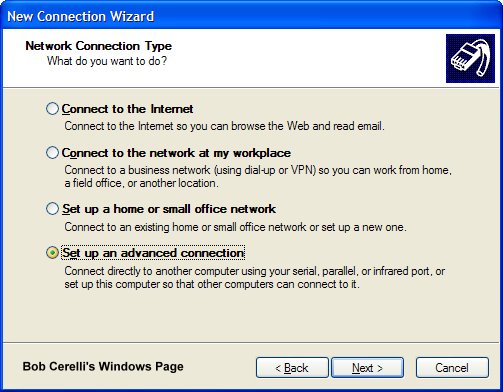
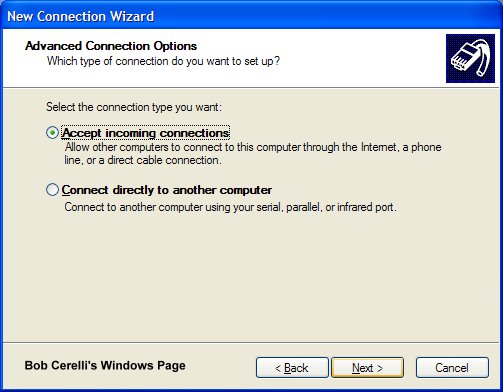
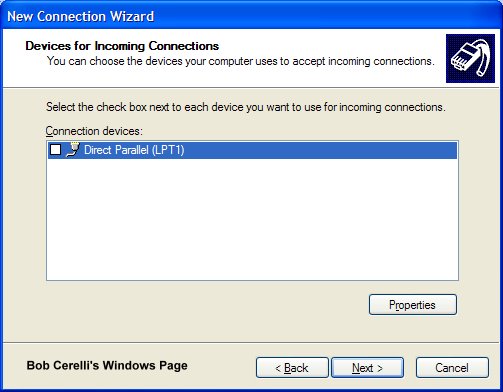
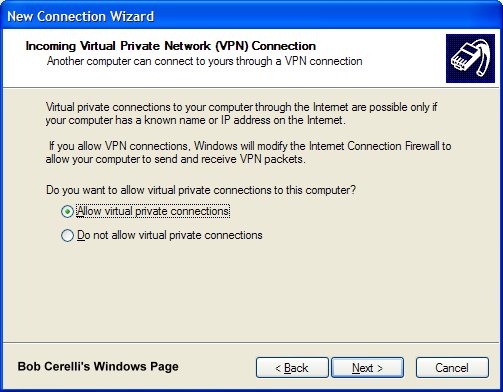
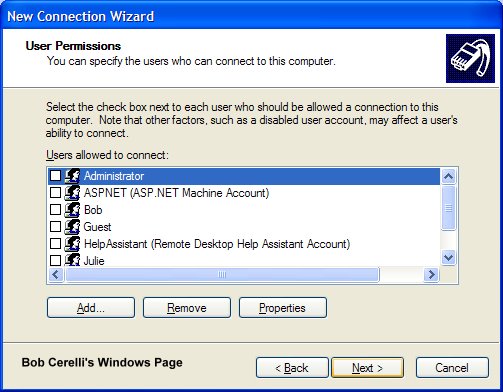
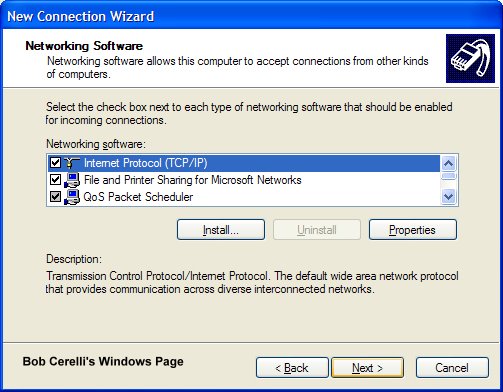
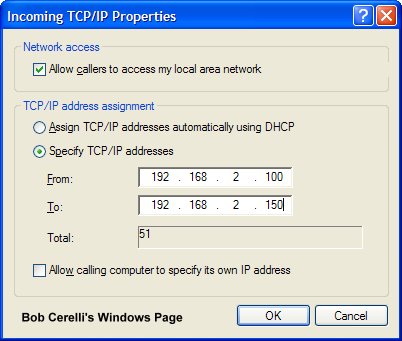
If the VPN server is behind a router, Port Mapping will need to be done on the router. Standard port usage is 1723 for PPTP. You might also need to configure your router for PPTP Passthrough. Port usage for IPSec is 500, 50-51. These ports will have to be forwarded to the VPN server's IP
- 8月 23 週二 201116:47
Configure Windows XP Professional to be a VPN server
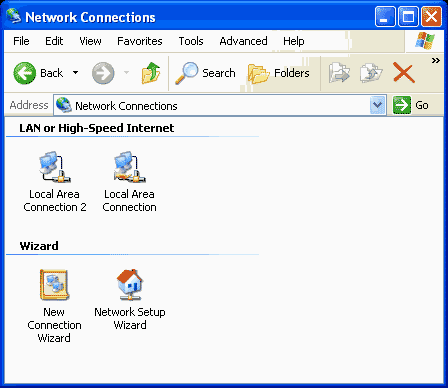
For the Small Office/Home Office (SOHO), Windows XP Professional VPN features are a real boon.
Traveling users with laptops or handheld computers will inevitably want files on the home network; you just can't bring everything with you. This is where the beauty of the Windows XP Professional computer connected to an always-on connection, such as DSL or cable modem, shines. That always-on link can be used to accept incoming VPN connections and allow your mobile users to access shared folders and files on your private network.
In this article, I’ll explain how to configure a Windows XP Professional computer to accept incoming VPN connections and discuss some tips on improving the remote access experience for the VPN client computer user.
Windows XP’s all-in-one VPN solution
Windows XP Professional is designed as the one-stop solution for the SOHO, taking all the usability features available to Windows Me users and adding the powerful networking features available in Windows 2000. The combination lets you create the ideal remote access solution for the SOHO.
- 8月 11 週四 201121:35
啟動或關閉 Windows XP 自動播放 (AutoRun)
啟動或關閉 Windows XP 自動播放 (AutoRun) 的方法:
一、使用群組原則
執行 → gpedit.msc → 電腦設定 → 系統管理範本 → 系統 →
關閉自動播放 → 已啟用 → CDROM光碟機 → 完成
二、手工運作
光碟片放入後, 一直按住 Shift 就會停止自動開啟.
三、更改 Registry
開始 → 執行 → regedit
HKEY_LOCAL_MACHINE \SYSTEM \ CurrentControlSet \Services \CDRom \Autorun 設 0 就關閉, 1 就開啟
四、軟體禁止
(1)安裝 Microsoft Powertoys 的 TweakUI,裡面可以設定取消。
(2)超級兔子 等優化系統軟體也有取消自動播放的機制。
一、使用群組原則
執行 → gpedit.msc → 電腦設定 → 系統管理範本 → 系統 →
關閉自動播放 → 已啟用 → CDROM光碟機 → 完成
二、手工運作
光碟片放入後, 一直按住 Shift 就會停止自動開啟.
三、更改 Registry
開始 → 執行 → regedit
HKEY_LOCAL_MACHINE \SYSTEM \ CurrentControlSet \Services \CDRom \Autorun 設 0 就關閉, 1 就開啟
四、軟體禁止
(1)安裝 Microsoft Powertoys 的 TweakUI,裡面可以設定取消。
(2)超級兔子 等優化系統軟體也有取消自動播放的機制。
- 7月 24 週日 201119:10
Windows xp install Vmware Tools
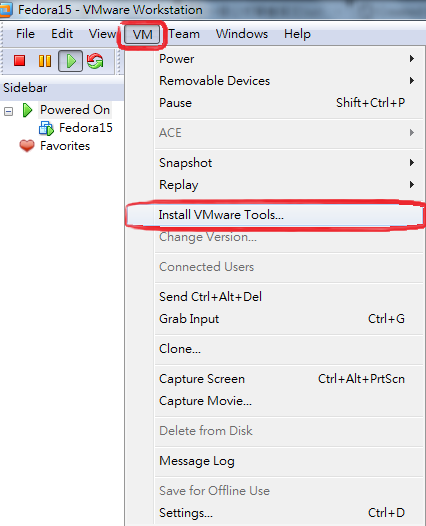
Vmware Tools Installation.
安裝完之後

 投資、股票、理財、銀行 (1)